
Site Sentry: Your Job Site Command Center, From Anywhere
Most project managers know what is happening on their job site during the day. They are there. They can see it.
The problem is every other hour. The fourteen hours after the crew leaves. The weekend. The holiday. The overnight window between when the last truck pulls out and when the first one shows up in the morning. That is when things go wrong — and for most GCs and project owners, that window has historically been a blind spot.
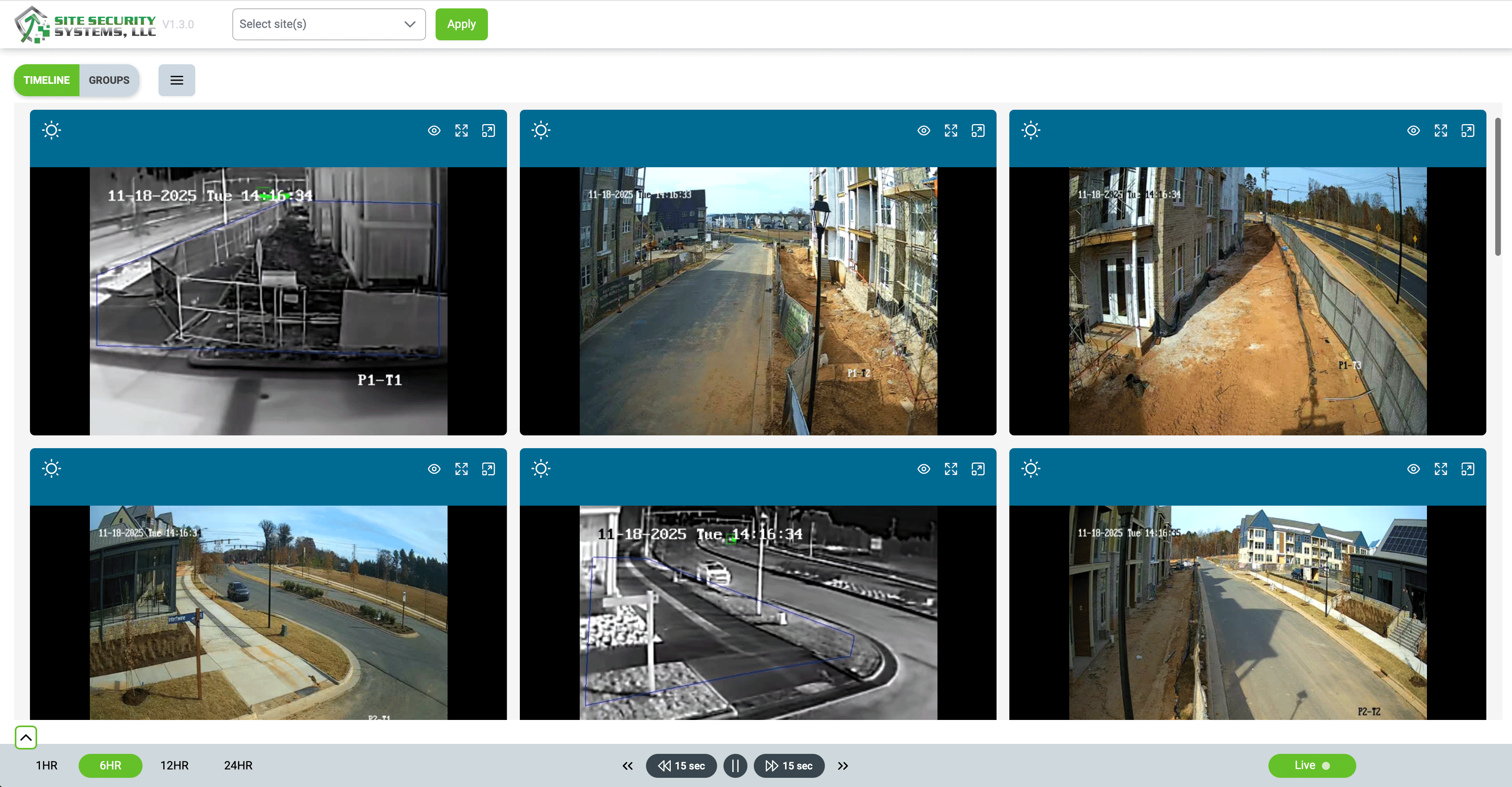
Site Sentry is built to close it. It is the platform that puts your job site in your pocket — live camera feeds, real-time alerts, activity logs, and full site control, accessible from your phone or desktop wherever you happen to be. Not in the morning when you arrive on-site. Right now, if you want to look.
One Platform. Total Visibility.
Managing job site security has traditionally meant a combination of things that do not talk to each other: a camera system from one vendor, an alarm from another, a monitoring service operating on its own communication channel, and a property manager or superintendent trying to hold all of it together manually. When something happens, the information is fragmented. Who has the footage? Who got the alert? Who called who?
Site Sentry replaces that fragmentation with a single, unified dashboard. Everything your site’s security system sees and does comes through one platform — live video feeds, motion alerts, access logs, incident reports, and system status. Whether you are managing one site or a dozen, it is all in the same place, organized the same way, accessible the same way.
That centralization is not just a convenience. It changes how fast you can respond to something, because you are not hunting for information across three different apps and two phone calls. The answer is in the platform, and the platform is in your pocket.
What Site Sentry Gives You
Live camera access, from anywhere
Pull up any camera on any site in real time — from your phone, your tablet, or your desktop. You do not need to be on-site to see what is happening on-site. A superintendent who wants to check the staging area before driving in on a Monday morning can do it from the driveway. A project owner who gets an alert at 11 p.m. can see exactly what triggered it without getting out of bed.
This is not a delayed feed or a recorded playback. It is live — the same feed the monitoring operators are watching, available to you on demand.
Real-time alerts
When something happens on your site — motion in a restricted area, activity after hours, a system alert — Site Sentry delivers a notification immediately. Not a digest. Not a morning summary. An alert, in real time, so you can decide what to do while there is still something to do about it. You can review the footage that triggered the alert directly from the notification, without opening a separate app or logging into a separate system.
Activity logs and incident reporting
Every event on your site is logged with a timestamp and a record of what happened and how it was handled. Authorized access. Unauthorized activity. Alerts triggered and how they were resolved. That log is available any time — for your own review, for insurance documentation, for a police report, for a conversation with a GC about what happened on a given night. You do not have to reconstruct it from memory or from scattered notes. It is already there.
Streamlined workflows and team access
Site Sentry is built for teams, not just individual users. Multiple team members can have access, with the ability to review footage, manage alerts, and coordinate response from their own devices. That means the site superintendent, the project manager, and the ownership team can all be in the loop simultaneously — without anyone having to relay information through someone else first.
Scalable across multiple sites
If you are managing a single project, Site Sentry gives you complete visibility into that site. If you are managing ten projects simultaneously, it gives you a unified view across all of them — same platform, same interface, same alerts structure. You do not need a different tool for each site or a different login for each project. Scale up or down as your project portfolio changes, without changing how you work.
Available on Every Device — Including Your Phone
Site Sentry is available on iOS and Android, which means the full capability of the platform travels with you. Check a live feed from the job site while you are in a client meeting. Review an overnight activity log from the car before you drive in. Pull up footage from a Tuesday night incident while you are on the phone with your insurance adjuster on Wednesday morning.
The mobile experience is not a scaled-down version of the platform. It is the full platform — the same live feeds, the same alerts, the same logs — optimized for a phone screen. Because the moments when you most need to see what is happening on your site are rarely the moments when you are sitting at a desk.
Why Site Sentry, and Why Site Security Systems
There are other security platforms available. What makes Site Sentry different is not the feature list in isolation — it is what the feature list is connected to.
Site Sentry is the client-facing platform for Site Security Systems’ full monitoring and security infrastructure. When you are watching a live feed in Site Sentry, you are looking at the same cameras that trained monitoring operators are watching around the clock. When an alert fires in Site Sentry, it is the same alert that triggers a response from the monitoring center. The platform and the service are integrated, not bolted together — which means the information you are seeing is the same information driving the real-time response on the ground.
That integration matters because a platform without a service behind it is just footage. And footage, as we have written about before, tells you what happened. What prevents something from happening is an active, monitored response — a system with trained operators watching, with audio intervention capability, with law enforcement coordination built into the workflow. Site Sentry puts you in the same picture as that system, in real time, from wherever you are.
The platform is also built to adapt. Whether you are running a single residential build or managing security across a portfolio of multifamily, commercial, and infrastructure projects, Site Sentry scales with you. New sites can be added as projects start. Access can be configured for different team members across different projects. The dashboard grows with your operation rather than requiring you to build a new workflow every time the project scope changes.
What You Get From Day One
Site Sentry is designed to be operational immediately. There is no extended onboarding, no weeks of configuration before it becomes useful. From the moment your monitoring system is deployed on-site, the platform is live and accessible. The deployment is fast, the interface is intuitive, and the support behind it is backed by a team that has been doing this for construction specifically — not a general security vendor trying to adapt a commercial platform for a job site environment.
From day one, you get:
- A live dashboard showing every camera on every active site
- Real-time alert notifications to your phone and desktop
- A full activity log with timestamps and incident documentation
- Team access so your superintendent, PM, and ownership team are all in the loop
- Mobile access on iOS and Android for visibility from anywhere
- The monitoring team behind the platform — watching, responding, and coordinating — around the clock
Your Job Site, In Your Pocket
The question every GC and project owner should be asking is not whether they have cameras on-site. It is whether they know what is happening on-site right now — at this hour, on this day, whether the crew is there or not.
Site Sentry makes that question easy to answer. Your site is in your pocket. The monitoring team is behind it. The platform connects both.
If you want to see Site Sentry in action for your site or portfolio, schedule a demo with the Site Security Systems team. You will see exactly what the platform shows, how alerts work, and what the monitoring integration looks like in practice — because seeing it is the fastest way to understand why it changes the way you think about job site security.
Schedule a demo: sitesecuritysystems.com/contact-us
Learn more: sitesecuritysystems.com/site-sentry